Every three years, PMI asks you for 60 PDUs. Each PDU stands for an hour of learning, teaching, or volunteering, so that’s a lot of hours you’re going to spend one way or another.
It’s tempting to spend them on whatever is free and fast: webinars half-watched in a second tab. The certificate renews. Nothing else changes.
Some PMPs are looking for something better: AI PDUs, renewal hours that also teach them to work with AI. It’s the right instinct. This post covers how AI courses count toward renewal, why AI alone is the wrong shopping list, and three Power BI dashboards worth building with what you learn.
How to Renew Your PMP Certification: 8 Steps
Can you earn PDUs for AI courses?
Yes. PMI doesn’t have a separate “AI” category. Every Education PDU is mapped to one of the three areas of the PMI Talent Triangle: Ways of Working, Power Skills, and Business Acumen. An AI or data course earns PDUs like any other qualifying course, in whichever area it’s mapped to.
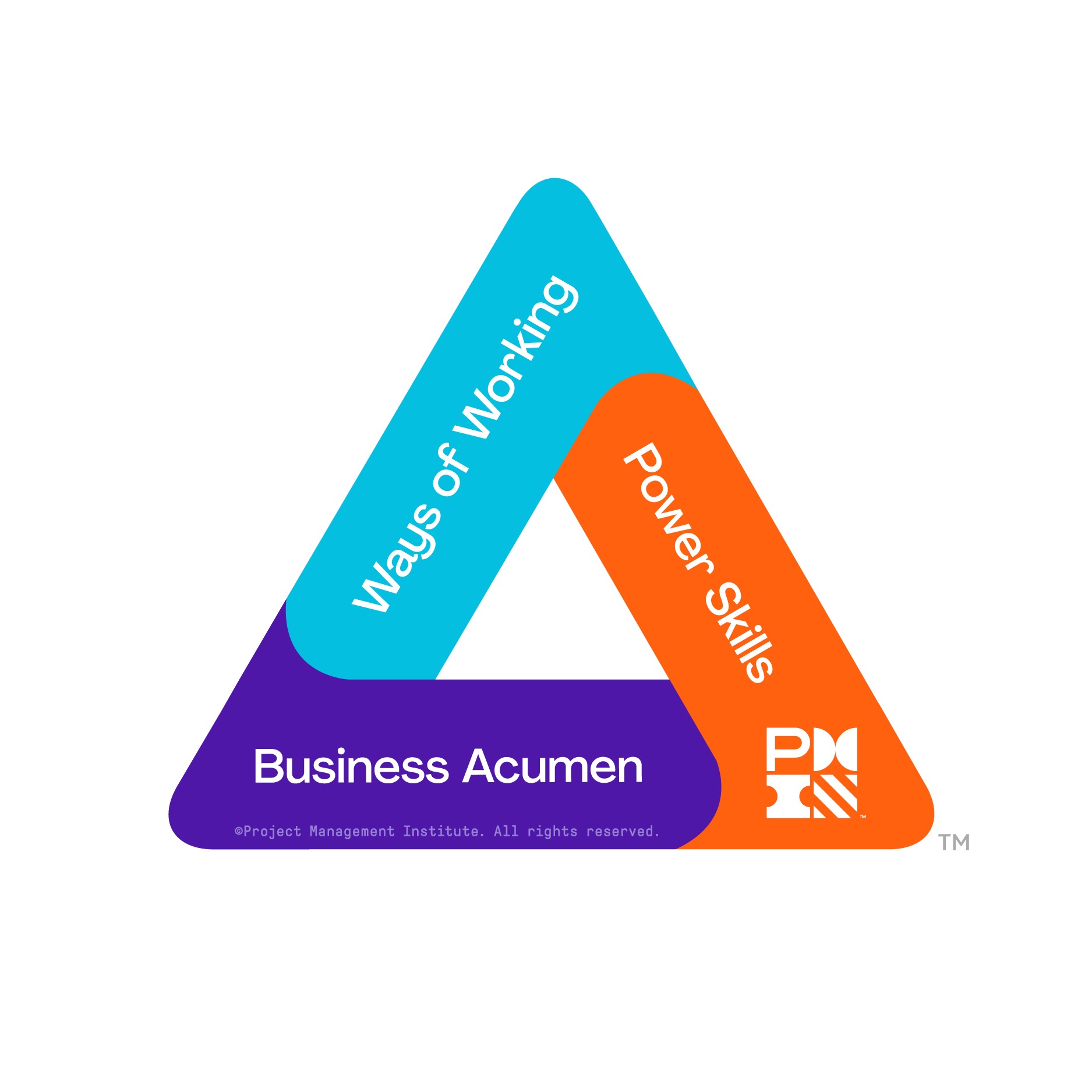
That mapping matters, because PMI sets a minimum for each area.
PMP renewal rules at a glance (as of October 2026)
Rules can change. Confirm the current requirements at pmi.org before you plan your cycle. For a full walkthrough, see how to earn 60 PMP PDUs. |
Here’s the trap. If every course on your list maps to the same Talent Triangle area, you can reach 60 PDUs and still be short of a minimum. Check the area breakdown before you buy, not after.
Why “AI” alone is the wrong shopping list
Most AI tools a project manager touches work on top of your data. That’s where an AI-only renewal plan falls short.
Take Copilot in Power BI. Microsoft’s documentation says it can create a report page from a plain-English prompt: you describe the page you want, and Copilot picks the tables, fields, measures, and charts. That’s a real shortcut.
But Copilot builds from the data model it’s given, and Microsoft’s documentation (as of October 2026) lists conditions the model has to meet first. The model’s Q&A setting has to be on, for example, and Copilot can’t create report pages when implicit measures are turned off. Someone still has to build a clean model, check what Copilot produced, and decide what leadership actually needs to see.
So the skills that make AI useful are data skills: modeling, analysis in Excel, forecasting, and enough understanding of analytics and AI to know what a tool is doing. The best AI PDUs teach both.
A chart built to win an argument
In 1858, Florence Nightingale published a chart in her report on the health of the British Army after the Crimean War. Her “Diagram of the Causes of Mortality in the Army in the East” showed, month by month, the death rates from wounds, from preventable disease, and from other causes. The wedges for preventable disease dwarfed the rest.
It became one of the most famous charts ever made, and it helped her win the case for sanitary reform. She went on to become the first woman elected to the Royal Statistical Society.
As the statistician M. Stone wrote of her in Statisticians of the Centuries, “Her goal was always the winning of the argument.” That’s still what a good dashboard is for. Not decoration: a decision.
Power BI for project managers: 3 dashboards that get you noticed
This is where builders earn their reputation. Three dashboards that leadership tends to open again and again:
1. The portfolio status page
One page, every active project: status, next milestone, owner, and the one risk that needs a decision. Built well, it replaces the slide deck someone rebuilds every week, and it’s the page your sponsor opens before a leadership meeting.
2. The milestone slip tracker
Planned versus actual dates for key milestones, with the slip trend over time. It turns “we’re a little behind” into a number, and it shows a project sliding weeks before its status turns red.
From Pit Lane to Project Milestone: What System Project Leaders Can Learn from Formula 1 Drivers
3. The budget burn and forecast
Spend to date against plan, plus a forecast of where the project lands at completion. This is where Excel and financial forecasting skills pay off. A forecast leadership trusts is one of the fastest ways to get pulled into bigger decisions.
Start with whichever one answers the question your sponsor asks most often. To pair Power BI with your schedule, see how Microsoft Project and Power BI skills set you apart.
A renewal plan that builds something
Here’s a simple test for any course on your renewal list: when you finish it, will you be able to build something you couldn’t build before? If the answer is no, it’s filling hours.
Building things your team uses is also how you stop being the project manager who runs the work and become the one people go to. More on that in how to stand out as a project manager.
Frequently asked questions
Can you earn PDUs for AI courses?
Yes. AI courses count toward PMP renewal like any other qualifying education activity. PMI has no separate AI category: each course’s PDUs are mapped to a Talent Triangle area (Ways of Working, Power Skills, or Business Acumen), and you need at least 8 PDUs in each area.
How many PDUs do I need to renew my PMP?
60 PDUs every three years. At least 35 must be Education PDUs, no more than 25 can be Giving Back PDUs, and you need at least 8 in each Talent Triangle area. You report them in PMI’s CCRS. Check pmi.org for the current rules before you plan.
Is Power BI worth learning for project managers?
For most project managers, yes. Power BI turns project data into dashboards leadership uses, and it shows up by name in project job postings. AI makes it more useful, not less: Copilot in Power BI can draft report pages from a prompt, but only on a data model someone built well.
| Renew your PMP. Learn to build.
The Data & BI Power 60 PDU Bundle covers your full 60-PDU renewal, including the 8-PDU minimum in each Talent Triangle area. You’ll learn:
It’s self-paced, and it includes guidance on submitting your PDUs to PMI. |
P.S. Not a PMP yet? The 9-Course Project Management Training Bundle pairs 35 contact hours of PMP training, which count toward the exam’s education requirement, with Power BI, an introduction to analytics and AI, and financial forecasting.